TASK 01: Prepare network devices for automation
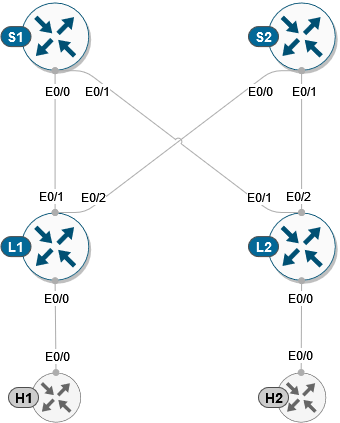
In this task, we will prepare our environment and devices for automation via ansible. This means that we will activate our virtual environment for python which have already preinstalled all necessary libraries and we will verify connectivity towards network devices.
Note
Virtual environment is set of python packages installed in their dedicated project folder. Each environment can use different versions of python packages, which enables you to manage your python dependencies on project basis.
First, we will start with activation of our virtual environment for python and we will enter project folder. This can be accomplished via commands below.
ansible@iol-ansible:~$ source ansible/bin/activate
(ansible) ansible@iol-ansible:~$ cd cat9k-evpn-ansible/dag/
(ansible) ansible@iol-ansible:~/cat9k-evpn-ansible/dag$
As you can see, after activation of virtual environment, prompt suffix will change to (ansible) indicating that virtual environment was activated. Now, lets start our lab devices and verify, that they are reachable. For this, please login to lab manager and select lab number 01.
After lab started, you may verify connectivity to each device via ping to below IP address. Please, note that it may a take few seconds prior device will become reachable after lab start. To break ping command, please execute CRTL+C.
Node name |
IP address |
|---|---|
Spine-01 |
10.1.1.1 |
Spine-02 |
10.1.2.1 |
Leaf-01 |
10.1.3.1 |
leaf-02 |
10.1.4.1 |
ansible@iol-ansible:~/cat9k-evpn-ansible$ ping 10.1.1.1
PING 10.1.1.1 (10.1.1.1) 56(84) bytes of data.
64 bytes from 10.1.1.2: icmp_seq=2 ttl=255 time=0.419 ms
64 bytes from 10.1.1.2: icmp_seq=3 ttl=255 time=0.293 ms
64 bytes from 10.1.1.2: icmp_seq=4 ttl=255 time=0.259 ms
To be able for ansible to connect to devices, devices must run SSH protocol and we must provide to ansible SSH credentials along with connection details. This definition can be found in the location below.
(ansible) ansible@iol-ansible:~/cat9k-evpn-ansible/dag$ cat group_vars/all.yml

ansible_connection: ansible.netcommon.network_cli
ansible_network_os: cisco.ios.ios
ansible_python_interpreter: "python"
ansible_user: cisco
ansible_ssh_pass: cisco123
In the variables ansible_user and ansible_ssh_pass are defined our device credentials and in variable ansible_connection is defined our connection plugin for SSH access. As for the inventory file, this can be found in location below.
(ansible) ansible@iol-ansible:~/cat9k-evpn-ansible/dag$ cat inventory.yml
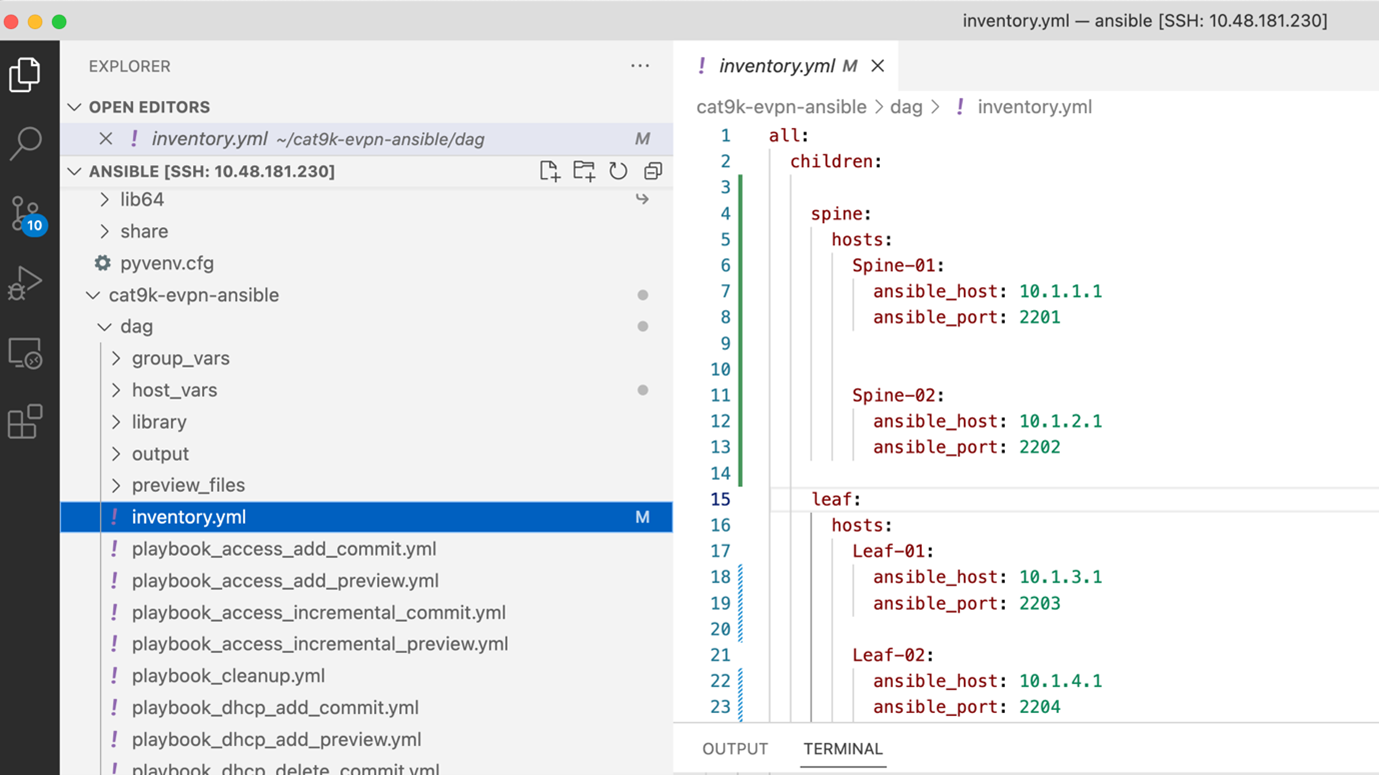
This file holds connection details to all devices in our testing topology. As you can see, devices are divided into two groups: spine and leaf. After this step, we are ready to run our first ansible playbook.
Prior we will come to this point, lets also examine current state of our lab devices. As you can see on Leaf-01, we have no configuration present and all protocols are currently down. During this lab, we will provision all necessary configuration parts from scratch.
 1cfg01-L1#show ip ospf neighbor
 2
 3cfg01-L1#show ip pim neighbor
 4PIM Neighbor Table
 5Mode: B - Bidir Capable, DR - Designated Router, N - Default DR Priority,
 6      P - Proxy Capable, S - State Refresh Capable, G - GenID Capable,
 7      L - DR Load-balancing Capable
 8Neighbor          Interface                Uptime/Expires    Ver   DR
 9Address                                                            Prio/Mode
10
11cfg01-L1#show bgp all summary
12% BGP not active
13
14cfg01-L1#show runn nve
15Building configuration...
16
17Current configuration : 7 bytes
18!
19end